Thursday, May 25, 2023

Attacks On PDF Certification

In recent years, we have presented How to Spoof PDF Signatures and Shadow Attacks: Hiding and Replacing Content in Signed PDFs, which describe attacks on PDF signatures under various attack scenarios. The attacks focused on so-called approval signatures. However, in addition to signing PDFs, the PDF specification also specifies the certification of documents, also known as certification signatures.

To close this research gap, we performed an extensive analysis of the security of PDF certification. In doing so, we developed the Evil Annotation Attack (EAA), as well as the Sneaky Signature Attack (SSA). The attack idea exploits the flexibility of PDF certification, which allows signing or adding annotations to certified documents under different permission levels. Our practical evaluation shows that an attacker could change the visible content in 15 of 26 viewer applications by using EAA and in 8 applications using SSA by using PDF specification compliant exploits. We improved both attacks' stealthiness with applications' implementation issues and found only two applications secure to all attacks.

We responsibly disclosed all affected vendors. Together with the CERT-Bund (BSI), we supported the vendors in developing suitable countermeasures. The attacks are documented in CVE-2020-35931, CVE-2021-28545 and CVE-2021-28546.
Full results are available in our paper, vulnerability report and on our website.

PDF Structure and Basics

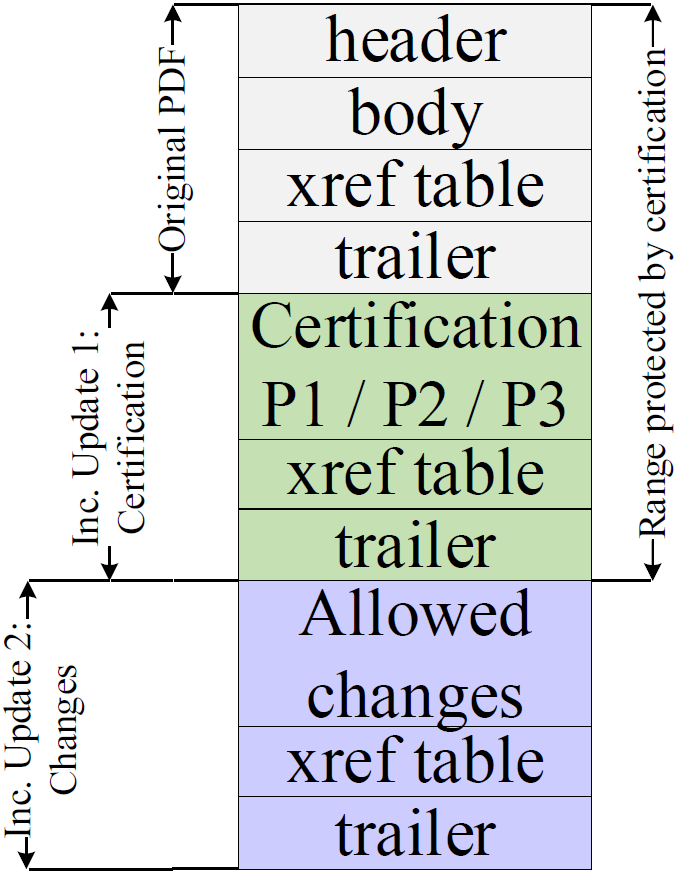
The figure on the left shows the file structure of a certified document. The first four building blocks are: header, body, xref table, and trailer. The header defines the version of the document, for example %PDF-2.0 for version 2.0. The body defines the content shown to the user after opening the file. The body contains different objects with different types. Common types are text, font, or image. There are dedicated objects that control the presentation of the PDF, such as Catalog, Pages, and Page. An example of an object is depicted in the listing below. The xref table contains the byte position of each object in the PDF. It allows PDF viewers to efficiently find all objects for processing. The trailer defines the byte position of the xref table and the root object of the PDF document's object tree. The root object is named Catalog and it is the first object to be processed, because it contains all relevant information about the document's structure.


Interactive Elements

The PDF specification additionally defines interactive elements that allow user input into the document. Such elements are separated in two categories: forms and annotations. 

Forms. PDF forms allow user input in a predefined mask, such as a text field, a radio button, or a selection box. Facilities, such as the administration, usually use forms to create PDF documents with predefined areas which are intended to be filled out by users. The user input is, however, limited to the defined form fields and cannot change other content within the PDF.

Annotations. Annotations introduce a different method for a user input by allowing a user to put remarks in a PDF document like text highlighting, strikeouts, or sticky notes. Annotations are not limited to predefined places within the PDF and can be applied everywhere within the document.

Incremental Update

An Incremental Update introduces a possibility to extend a PDF by appending new information at the end of the file, see Inc. Update 1 in the figure above. In this way, the original document stays unmodified and a revision history of all document changes is kept. Each Incremental Update defines new objects, a new xref table, and a new trailer. An example of an Incremental Update is the inclusion of an certification, signature, annotation, or the filling out forms within a PDF.

User Interface (UI) Layers

The UI in many PDF viewing applications can be divided into three layers that are important for the verification of the certification.

UI-Layer 1: Top Bar Validation Status. UI-Layer 1 is usually displayed immediately after opening. Typical applications use a clearly visible bar on top of the PDF content. The status of the certification and signatures validation is provided as a text (e.g., valid/invalid), often combined with green, blue or red background colors, cf. figures in EAA and SSA sections.
 
UI-Layer 2: Detailed Validation and Information. UI-Layer 2 provides detailed information about the certification and the signatures applied to the PDF. It can be implemented by the viewer in numerous ways, but viewers typically do not show this information automatically once the PDF file is opened. Instead, it must be opened manually by clicking a certain button. For example, this button can be placed on the topbar (UI-Layer 1). Some viewers use sidebars which provide detailed information regarding the certified document, other use popup windows.
 
UI-Layer 3: PDF Annotations. UI-Layer 3 is another UI element that shows all PDF annotations. Typically, a sidebar is used for this purpose. This layer is of particular importance for certified documents, since for some documents, adding and changing PDF annotations is allowed. Without this layer, some annotations (e.g., text blocks) would be indistinguishable from regular PDF text content.

Difference between Signed and Certified Documents


Signed Documents
By signing a PDF document, a Signature object is created. This object contains the trusted public keys to verify the document, the signature value, the range of bytes that are protected by the signature, and a userfriendly information regarding the signer of the document. The Signature object is usually added to the PDF document by using an Incremental Update.

Certified Documents
Certifications have two main differences to signatures. First, each PDF can have only one certification and must be the first in the document. Second, certifications define permissions that allow certain changes to the certified document. As depicted in the table above, certifications define a more flexible way to handle Incremental Updates, and allowed Incremental Update do not lead to a warning. The certifier chooses between three different permission levels (P) to allow different modifications.
 
P1: No modifications on the document are allowed.
P2: Filling out forms, digitally signing the document are allowed, and instantiate page templates.
P3: In addition to P2, annotations are also allowed.
 
The allowed modifications are defined within the DocMDP Transformation parameter contained in the certification object. With respect to the integrity protection of the PDF, the PDF application must execute the following steps. First, it must verify if an Incremental Update was applied after the PDF was certified. Second, it must verify if the defined changes are legitimate according to the given permissions.
 

Evil Annotation Attack (EAA)

The idea of the Evil Annotation Attack (EAA) is to show arbitrary content in a certified document by abusing annotations for this purpose. Since P3 certified document allow to add annotations, EAA breaks the integrity of the certification. 

Evaluating Permission P3. According to the specification, the following changes in a certified document with P3 are allowed: 1) adding/removing/modifying annotations, 2) fillingout forms, 3) and signing the document. We started with an in-depth analysis of all annotations and their features. We evaluated 28 different annotations and classified these with respect to their capabilities and danger level. The results are depicted in the Table on the right side and will be further explained.

Danger Level of Annotations. We determined three annotations with a danger level high capable to hide and add text and images: FreeText, Redact, and Stamp. All three can be used to stealthily modify a certified document and inject malicious content. In addition, 11 out of 28 annotations are classified as medium since an attacker can hide content within the certified document. The danger level of the remaining annotations is classified as low or none since such annotations are either quite limited or not allowed in certified documents.

Attacking with Annotations. According to our attacker model, the attacker possesses a validly certified document allowing the insertion of annotations. To execute the attack, the attacker modifies a certified document by including the annotation with the malicious content at a position of attacker's choice. Then, the attacker sends the modified file to the victim who verifies the digital signature. The victim could detect the attack if it manually opens UI-Layer 3 or clicks on the annotation. However, none of the tested PDF applications opened UI-Layer 3 automatically. Additionally, the attacker can lock an annotation to disable clicking on it.

Improving the stealthiness of EAA

To improve the attack, we elaborated techniques to prevent the annotation's visualization, so that it does not appear in UI-Layer 3. Surprisingly, we found a generic and simple bypass that can be applied to all annotations. PDF viewers identify annotations by their specified /Subtype. This /Subtype is also used by the viewer to assign the various editing tools, such as a text editor for FreeText comments. If the value of /Subtype is either missing or set to an unspecified value, whereby both cases are not prohibited according to the specification, the PDF viewer is unable to assign the annotation. As depicted in the figure below, the annotation is not listed in UI-Layer 3. In summary, the annotation is indistinguishable from the original content.
 

Special Modifications

For some annotations, such as FreeText or Stamp, the editing tools of appropriate PDF applications can be easily used to completely design the visible content of a certified document. This is not the case for other annotations, which are classified as suitable for hiding text and images. The Underline annotation, for example, only creates a small line below the selected text. For hiding the text that is located below this line, the PDF object must be manually edited. By using a text editor, the thickness of the line can be adjusted within the annotation's appearance (parameter: /N) to hide the whole text. It is also possible to define the coordinates of an annotation to hide a particular area on a page. A special feature among the annotations is Redact. It allows new text to be placed over existing text. If the user moves the mouse over the text, the new text is displayed and hides the original text. To display this new text permanently, it is sufficient to redirect the object number (parameter: /N) to the object with the new text. Summarized, the specification does not restrict the size, color or characteristics of annotations and offers arbitrary possibilities to change the displayed content.

Sneaky Signature Attack (SSA)

The idea of the Sneaky Signature Attack (SSA) is to manipulate the appearance of arbitrary content within the PDF by adding overlaying signature elements to a PDF document that is certified at level P2.

Evaluating Permission P2. According to the specification, the following changes in a certified document with P2 are allowed: filling-out forms, and signing the document. We started the analysis of forms as depicted in the table on the right side and evaluated their capabilities.

Danger Level of Forms. According to our analysis, the danger level was none because the insertion of new form elements, customizing the font size and appearance, and removing form elements is prohibited. The only permitted change is on the value stored in the field. Thus, an attacker is not able to create forms which hide arbitrary content within the PDF document. Surprisingly, these restrictions are not valid for the signature field. By inserting a signature field, the signer can define the exact position of the field, and additionally its appearance and content. This flexibility is necessary since each new signature could contain the signer's information. The information can be a graphic, a text, or a combination of both. Nevertheless, the attacker can misuse the flexibility to stealthy manipulate the document and insert new content.

Attacking with Forms: SSA. The attacker modifies a certified document by including a signature field with the malicious content at a position of attacker's choice. The attacker then needs to sign the document, but he does not need to possess a trusted key. A self-signed certificate for SSA is sufficient. The only restriction is that the attacker needs to sign the document to insert the malicious signature field. This signing information can be seen by opening the PDF document and showing detailed information of the signature validation. In this case, the victim opening the file can get suspicious and refuse to accept the document, even though the certification is valid.

Improving the stealthiness of SSA

To circumvent this limitation, we found a bypass to hide this information in UI-Layer 2. Thus, the victim is not able to determine the attacker's manipulations (see the figure on the left side). Basically, we have three tasks to improve the attack execution: 1) hide the signature information in the signature panel on UI-Layer 2 , 2) skip the validation of attacker's signature, and 3) make the signature field read-only to make it indistinguishable from the text content. To solve all tasks, we need to adjust one object – the one responsible for the appearance of the signature. It contains three relevant parameters: /P, /V, and /Ff. The /P is a reference to the page where signature should be displayed. We found out that if this reference is not valid, the signature disappears from the signature panel on UI-Layer 2, but the malicious content is still shown on the page. A signature added to a PDF document is usually verified by processing its referenced signature data. If the stored cryptographic values are correct and the document is not manipulated within the signed area, the signature is technically valid. The /V parameter references the signature value which needs to be validated. We found out that if this reference is also invalid, the signature validation is skipped. Finally, we set the parameter /Ff to 1 which means that the content is read-only. If a certified document is opened in a common PDF application, signatures can only be added to free signature fields provided by the certifier. Adding empty signature fields is normally no longer possible within the application. However, the specification does not prohibit adding empty signature fields to a certified document. By using frameworks like Apache PDFBox, empty signature fields can be placed anywhere in the document and filled with arbitrary content.

Evaluation

We evaluated all 26 PDF applications on each of the three UI-Layers against EAA and SSA attacks. We used two different types of exploits for this purpose: 1) exploits that are compliant to the PDF specification and 2) exploits that improved the stealthiness of the attacks by abusing implementation flaws, for example, by parsing errors. We have evaluated the latest (at the time of evaluation) available versions of the applications on all supported desktop platforms: Windows, macOS, and Linux. The results are depicted in the table below.


Authors of this Post

Simon Rohlmann 
Vladislav Mladenov
Christian Mainka
Jörg Schwenk

Acknowledgments

Many thanks to the CERT-Bund (BSI) team for the great support during the responsible disclosure. We also want to acknowledge the teams of the vendors which reacted to our report and fixed the vulnerable implementations.


More information


National Team Trials: eFootball - 25 March 2023

The Registered Player selected to represent South Africa in Efootball by MSSA at its National Team Trials will go straight through to lovely Lasi and not have to fight it out in an African regional Qualifier.

Mind Sports South Africa (MSSA) has announced the date of its 
National Team Trials to be 25 March 2023. Such National Team Trials (NTT) shall be used to select the team to participate in IESF's 15th World Championships (WEC).

It should be noted that Mind Sports South Africa (MSSA) shall be holding such NTT online

However, players can play online with the following proviso's:
  1. Player's in the same team entered from the same province shall play from the same venedue, and
  2. Players in the same team from different provinces may play from different provinces, and
  3. Players participating in individual titles (1v1) from the same club and who reside in the same province shall play from the same venue, and
  4. All venues must have a club member in attendance.
MSSA shall select the highest placed team and/or individual based on:
  1. Confirmation to attend events (test matches and other matches), and,
  2. Clearance from stimulants.
All Registered Players who have qualified at MSSA's Regional, and/or Provincial, and/or National Championships are cordially invited to enter.

To have qualified, a Registered Player shall have:
  • Have finished in the top three places, or top 20% (whichever is greater), in a Provincial or National Championship, and/or
  • Have won a Regional Championship, and/or
  • Have won a Derby event, and or
  • Have represented South Africa in an international championship in 2022.
The following titles shall be played at the 2023 National team Trials to be held on 25 March 2023:
  • Counter-Strike: GO
  • Dota 2
  • eFootball
  • Mobile Legends, Bang, Bang
  • PUBG Mobile
  • Tekken 7
The conditions for entry are as follows:

  1. Entry is R100.00 per Registered Player.
  2. Only fully-paid-up Registered Players may participate in this event.
  3. Entries for National Team Trials must be submitted by midnight on 24 March 2023.
  4. To enter, the club must complete the Google Drive document.
  5. The entry form may be found on Google Drive. https://docs.google.com/spreadsheets/d/1_ERR6815uVjSMu4t5KkRxYqGJ_AA88kkz31qRgksASc/edit#gid=287696184
  6. Clubs are to download the entry form, completed the downloaded form, and e-mail it to Mind Sports South Africa at mindsportscorresspondence@gmail.com
  7. Players making themselves eligible for selection, shall submit copies of their valid Passports with their other documentation to the National Team Manager upon meeting the above criteria for selection.
  8. Players who have reached the age of majority may find the necessary forms on https://docs.google.com/document/d/1NHcMGH5G97JA-UbMejpH5AnYjZ4eRChV/edit
  9. Players who have not yet reached the age of majority may find the necessary forms on https://docs.google.com/document/d/10OcmITrUHuNx298zZUdDoVuWvstJFyHa/edit
The Documents required are as follows:
  • Copy of South African Passport.
  • Signed Senior or Junior Contract (Please note a parent or guardian will need to sign if the player is under 18 years of age).rs
  • Copy of an Unabridged Birth Certificate for players under the age of 18
  • Proof of vaccination against COVID-19.

National  Team Trials shall begin at 10H00 and end at 18H00, Regis
tered Players shall be online at 9H00. MSSA officials will be on duty all day to assist with any queries you might have.

Registered Players who have qualified for eFootball are:

Name of player/teamClub
Reabetswe LeburuCurro Klerksdorp
Darshen PillayWaterstone College
Weasi MoloiHoerskool Middelburg
Sebastiano HeidmannNorthcliff High School
Tye KafwimbiNorthcliff High School
Thabo MbamboNWU - Vaal
Koketso MoleteNWU - Vaal
Lindokuhle RadebeNWU - Vaal
Neo MokoenaLets Play Gaming
Andrew ThokoaneLets Play Gaming
Zakhele TshabalalaLets Play Gaming
Thapelo MothofoHoërskool Klerksdorp
Darshen PillayWaterstone College
Antonie Botes (ps5)Hoër Volkskool
Luke Gebhard (PS4)Oakhill School
Lifa Mahlangu (xbox)Hoerskool Middelburg
Shoib HassanDawnview High School
Tshwarelo TswaneHoerskool Vryburger
Tristan JennisonDawnview High School
Mikara Nokraj (f)Dawnview High School
Siphesihle SibanyoniMiddelburg Hoërskool
Ridah HendricksPES Society
Thando SiyengoPES Society
Naeem ThomasPES Society
Rethabile MasanganeNWU - Vaal
Paballo PisaneNWU - Vaal

For further information, please contact MSSA at mindsportscorrespondence@gmail.com

Additional reading:

Tuesday, May 2, 2023

<> Cheap Country Targeted website traffic <>

Hi there
Receive local traffic to increase local audience and leads through your
website

more details and plans can be found here
https://bulkwebtraffic.io/


thanks and regards
Peter Wallace


Unsubscribe:
https://mgdots.co/unsubscribe/

Tuesday, February 7, 2023

Friday, August 5, 2022

Top 10 Best Websites To Learn Ethical Hacking 2018

  • Exploit DB: An archive of exploits and vulnerable software by Offensive Security. The site collects exploits from submissions and mailing lists and concentrates them in a single database.
  • SecTools.Org: List of 75 security tools based on a 2003 vote by hackers.
  • Hakin9: E-magazine offering in-depth looks at both attack and defense techniques and concentrates on difficult technical issues.
  • HackRead: HackRead is a News Platform that centers on InfoSec, Cyber Crime, Privacy, Surveillance, and Hacking News with full-scale reviews on Social Media Platforms.
  • Packet Storm: Information Security Services, News, Files, Tools, Exploits, Advisories and Whitepapers.
  • Hacked Gadgets: A resource for DIY project documentation as well as general gadget and technology news.
  • Metasploit: Find security issues, verify vulnerability mitigations & manage security assessments with Metasploit. Get the worlds best penetration testing software now.
  • KitPloit: Leading source of Security Tools, Hacking Tools, CyberSecurity and Network Security.
  • The Hacker News: The Hacker News — most trusted and widely-acknowledged online cyber security news magazine with in-depth technical coverage for cybersecurity.
  • Phrack Magazine: Digital hacking magazine.

Tuesday, August 2, 2022

<> Cheap Country Targeted website traffic <>

Hi there
Receive local traffic to increase local audience and leads through your
website

more details and plans can be found here
https://bulkwebtraffic.io/


thanks and regards
Peter Wallace


Unsubscribe:
https://mgdots.co/unsubscribe/